- APRS Over Satellites
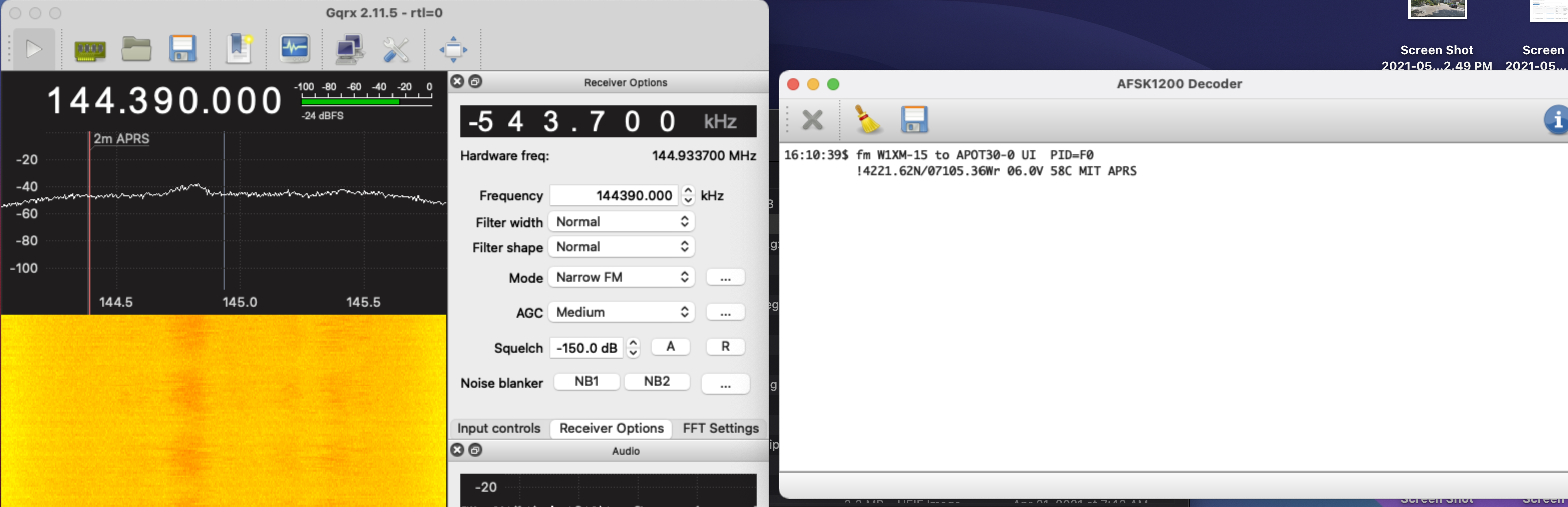
- Successful listening with gqrx and the built-in AFSK1200 decoder
- Installing Xastir to set up an APRS iGate
- http://xastir.org/index.php/Homebrew
- Use via command line after running XQuartz with
xastir & - Still need to do some configuration. Installation was done 2021-06-06
- Xastir with RTLSDR
- Need to use multimon-ng with rtl_fm and
socatrtl_fm -f 144390000 -s 22050 -o 4 -g 100 - | multimon-ng -a AFSK1200 -A -t raw - | sed -u -r 's/^.{6}//' | socat -u STDIN TCP-LISTEN:14580,reuseaddr,fork- Then Xastir needs to have connect to an internet server with localhost:14580
- I set this to an alias
start_aprs
- Configuration
- Run callpass to generate
- Station
- GPS, comments
- Defaults
- Enable RF->Inet OR 2-way
- Interface
- Internet for APRS Tier 2 server interface (along with radio interface if want to function as igate)
- This should be allowed to transmit
- Password from
callpassgoes here
- Internet for APRS Tier 2 server interface (along with radio interface if want to function as igate)
- Need to use multimon-ng with rtl_fm and
- Xastir with RTLSDR
- To use Xastir with SDR
- Run
start_aprsalias - Launch XQuartz
- From the terminal that pops up, run
xastir &
- Run
- How to pass messages to internet?
- Set up password by running
callpass <callsign>to send and receive, add that to Tier 2 server interface config - I added another internet interface and pointed it to one of the Tier 2 APRS servers. I haven’t seen anything on APRS.fi yet though.
- Enable RF->Inet OR 2-way also needed. Verified on aprs.fi
- Set up password by running
- Thinking about getting a Baofeng UV-5R for cheap APRS operation
- Got it
- Get Started with APRS with RTLSDR and Xastir on Mac Hub Page
Other Modes#
FT-8